What Is Construction Management Software? A Plain-Language Guide
What is construction management software? A plain-language guide to what it does, who uses it, the modules that matter in India and when a team needs it.
Construction management software is a system that keeps one shared record of a project's plan, daily progress, cost, bills, people, materials and documents, so that the office and the field work from the same numbers. Instead of a schedule in one spreadsheet, measurements in a notebook, attendance on WhatsApp and the bill in Tally, every entry lives in one place and every report is built from it.
If you have ever asked "what is construction management software" while watching a progress bill (RA bill) get rebuilt from three different Excel files, the short answer is: it is the system that makes that rebuild unnecessary. The rest of this guide explains what the software actually does, who in a project team uses it, which modules matter for engineering and industrial projects in India, and how to tell whether your firm needs it yet.
What is construction management software, in practice
Strip away the labels and a construction management platform does five jobs:
- Plans the work. A project is broken into tasks or work packages with dates, dependencies and owners, usually on a Gantt chart with a visible critical path.
- Records what happened today. Field engineers log a daily progress report, attendance, materials received and blockers from a phone, with photos and a location stamp.
- Tracks money against the contract. The BOQ (bill of quantities) is loaded item by item, measured quantities are recorded against it, and progress bills are generated from those measurements with GST handled correctly.
- Manages people, materials and machines. Attendance feeds payroll, material requests go through approval before stock is issued, and vehicles and plant are costed per project.
- Keeps the paper trail. Letters from the client or authority, drawings, change orders and extension-of-time (EOT) requests are registered, versioned and searchable.
The important word is connected. A spreadsheet can do any one of these. The software's value is that a measurement entered on a workfront on Tuesday shows up in the budget, the bill and the owner's dashboard on Tuesday, without anyone retyping it.
Who uses it, and what each person sees
A good platform is role-aware, because a field supervisor and a CFO need different screens.
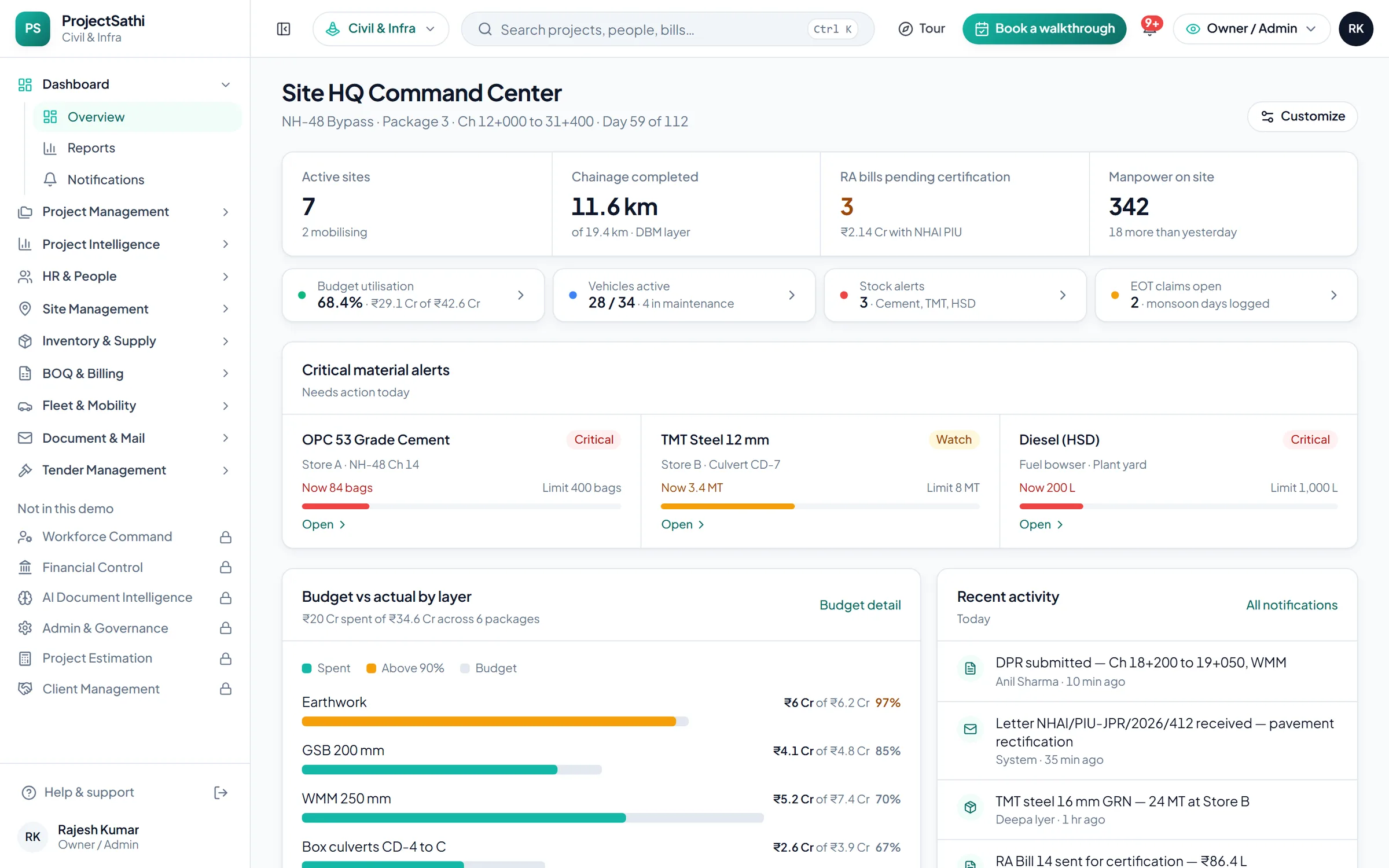
- Owner or managing director: a dashboard of every active project, budget utilisation, pending approvals, cash position and alerts. In the ProjectSathi demo, the civil dashboard opens with active sites, chainage completed, progress bills pending certification and workforce on site.
- Project manager: the Gantt, task board, BOQ vs actual at item level, and the approval queue for material requests and bills.
- Field engineer or supervisor: the mobile app for daily logs, attendance, inspections and photos. Offline-first matters here; a tunnel portal or a refinery unit rarely has reliable signal.
- Billing and finance: the BOQ, measured quantities, the progress bill workflow and GST and TDS on each invoice, plus payroll and imprest if those are on the platform.
- Stores and procurement: stock per location, material requests, reorder alerts and vendor records.
Role-based permissions keep this clean. A project manager should not see payroll; a field engineer should see site work and stores but not edit certified records.
The modules that matter for Indian projects
Global tools are often built around the general-contractor model and assume a separate accounting stack. Engineering and industrial projects in India have a few requirements that a platform must handle natively:
- BOQ-driven billing. Contracts with NHAI, state PWDs, CPWD and most private clients are measured and billed item by item against a BOQ. The software has to carry the BOQ, the rate analysis and the cumulative progress bill, not just a lump-sum invoice. See the BOQ & Billing module for how this looks when it is built in.
- GST on works contracts. CGST and SGST or IGST split by place of supply, HSN or SAC codes on line items, and an export your accountant can file from.
- Statutory workforce compliance. PF, ESI, professional tax and TDS per employee, attendance that feeds payroll, and a record that survives a labour inspection.
- Authority correspondence. Inward and outward letters with reference numbers and reply-due dates, because an EOT claim is only as good as the letters behind it.
- Field evidence. Geo-stamped photos, weather logs and inspection checklists that hold up when a quantity is questioned.
The same module set stretches across industries with different vocabulary. A road contractor tracks chainage and layers and bills on an RA bill; a mechanical EPC team tracks spools erected and work packages and bills a progress bill against the owner and the PMC. The Project Management module is the same workspace in both cases; the labels change.
What it replaces
Most firms asking what is construction management software going to replace arrive from one of three starting points:
- Excel and WhatsApp. The schedule is a spreadsheet, the daily progress report is a WhatsApp message with photos, and the bill is assembled at month-end. This works until the fourth or fifth concurrent project, when nobody can say what was actually measured last week. The guide on moving a construction business off Excel covers that transition step by step.
- Accounting software alone. Tally or Zoho Books knows what was invoiced and paid, but not what was executed, so the bill is always built outside it and keyed in afterward.
- A point tool. An attendance app, or a DPR app, that solves one problem but does not connect to billing or cost.
Construction management software does not replace the accounting ledger. It sits upstream of it, producing the certified bill and the payroll file that the accountant then books.
Signs a project team needs it
You probably need a platform rather than better spreadsheets when:
- You run more than three or four projects at once and cannot see them side by side.
- Progress bills take weeks to prepare because measurements are reconstructed from diaries.
- Material consumption on a project cannot be reconciled against what was issued.
- An EOT claim fails because the daily records are incomplete.
- Attendance and payroll are reconciled by hand each month across several locations.
- The owner learns about a cost overrun from the bank balance, not from a report.
If only one of these applies, a focused module may be enough. If three or more apply, the problem is the missing connection between modules, which is what a platform supplies.
How to evaluate one
Do not start with a feature list. The useful answer to what is construction management software worth to your firm comes from your own project:
- Pick one live project and one real progress bill from it.
- Ask the vendor to show the path from a field measurement to that bill, including GST and deductions.
- Check the mobile app works offline, then syncs cleanly.
- Ask who sees what: can a project manager be kept away from payroll?
- Ask what onboarding includes and how long the first project takes to go live.
The quickest way to form an opinion is to use a demo on sample data. The ProjectSathi demo lets you pick your industry and type of work, opens a workspace with sample projects in that vocabulary, and walks you through the morning numbers, the schedule, stock and bills in about ninety seconds before leaving you to click around.
Where ProjectSathi fits
ProjectSathi, by Aryavrut, is a project management platform for engineering and industrial projects in India: civil and infrastructure, mechanical and EPC, chemical and process, energy and utilities, plus a studio edition for architecture and interiors. It is sold as an annual contract with onboarding included, and there is a 90-day pilot on one project for teams moving off Excel for the first time. Pricing is quoted for your company after a demo.
If you would rather see the platform set up on one of your own projects, with your BOQ and your team, schedule a demo and we will walk through it with you.
Frequently asked questions
What is the difference between construction management software and a construction ERP?
Construction management software focuses on planning, field execution, cost tracking and billing for projects. A construction ERP adds the enterprise layer: general ledger, procurement across the company, multi-entity accounting and HR. Many mid-size firms use a project platform for execution and billing and keep a separate accounting system such as Tally for the ledger, connected by an export.
Is construction management software only for civil contractors?
No. The same functions, planning, daily logs, BOQ-based billing, workforce, materials and documents, apply to mechanical and EPC work, chemical plant expansions and energy projects. What changes is the vocabulary: chainage and RA bills on a road, spools and work packages on a piping job, blocks and milestone invoices on a solar park.
Does the field team need internet access to use it?
Not for daily work. A well-designed mobile app records attendance, daily logs and photos offline and syncs when the phone reconnects. This is essential on remote workfronts, inside plants and in basements.
How long does it take to get started?
It depends on scope. A single-project rollout with field management and attendance can go live in about two weeks. Adding billing, payroll and inventory across several projects typically takes four weeks or more, including training and data setup.