
DashboardA real-time command center for active projects, field headcount, BOQ utilisation, pending approvals, and material flow.
Every spool, crane and work package — on one critical path. Shutdowns, fabrication and erection, piping — work packages on one critical path.
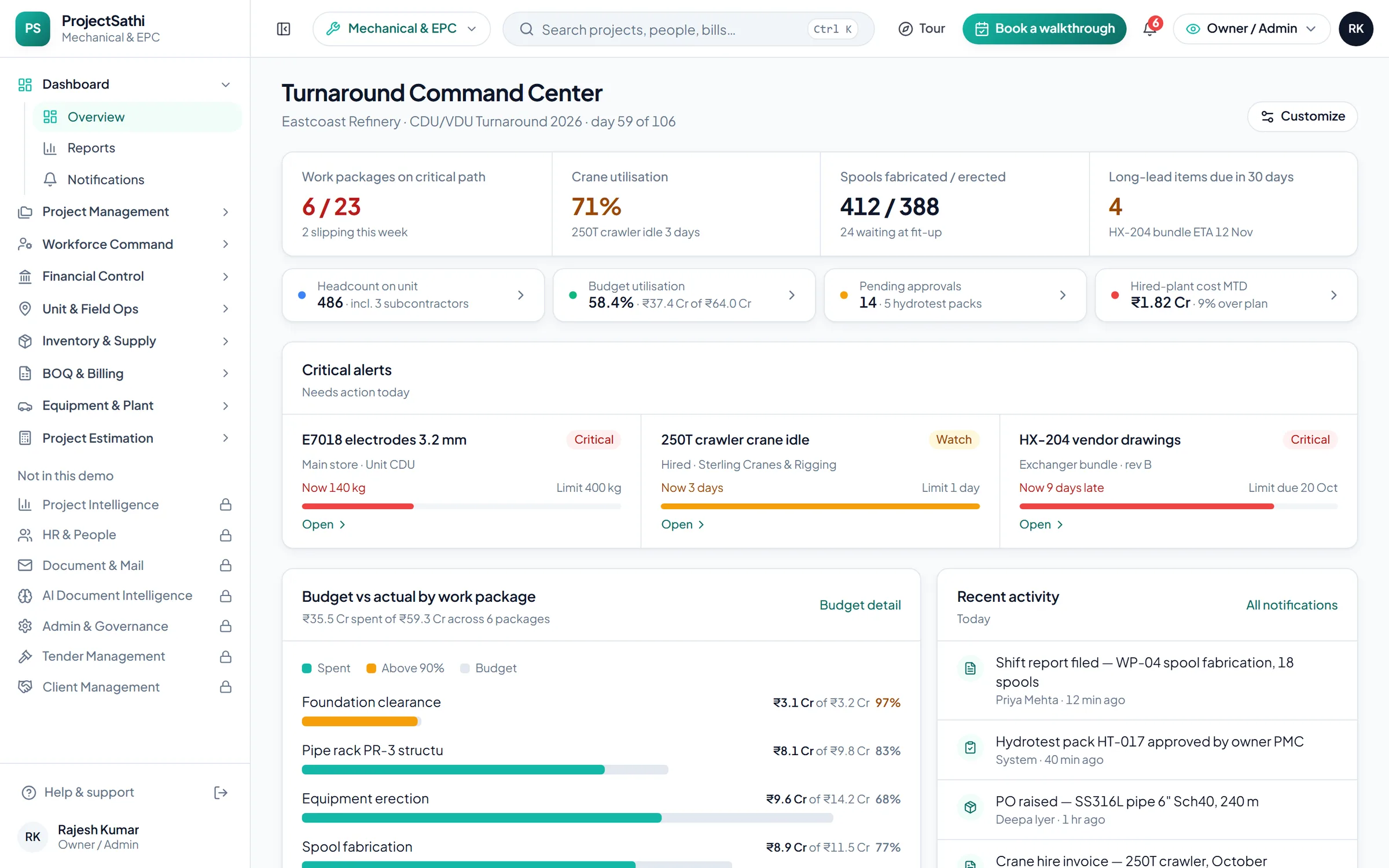
What the demo opens on
The first screen is the sample project Eastcoast Refinery · CDU/VDU Turnaround, with the figures a Mechanical & EPC team checks first thing in the morning. Every number links to the module behind it.
In your vocabulary
Three screens from the Mechanical & EPC demo, as they open the moment the setup wizard finishes.
Progress is measured in spools erected. The critical path, what is behind, and the milestone that matters, on one Gantt.
Project Management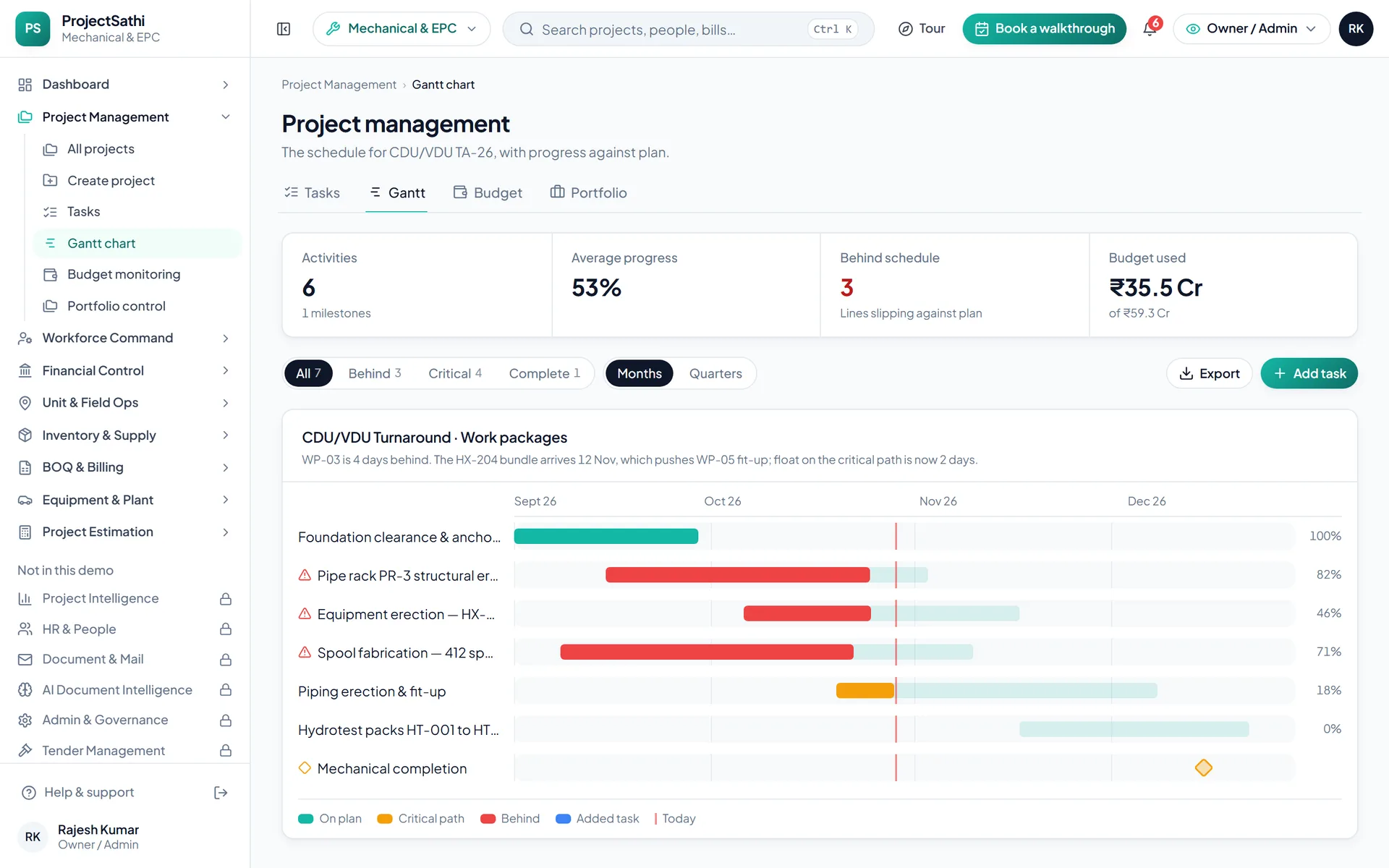
What is on hand against the reorder point, what is on request, what is on its way. Long-lead items with their own register.
Inventory & Supply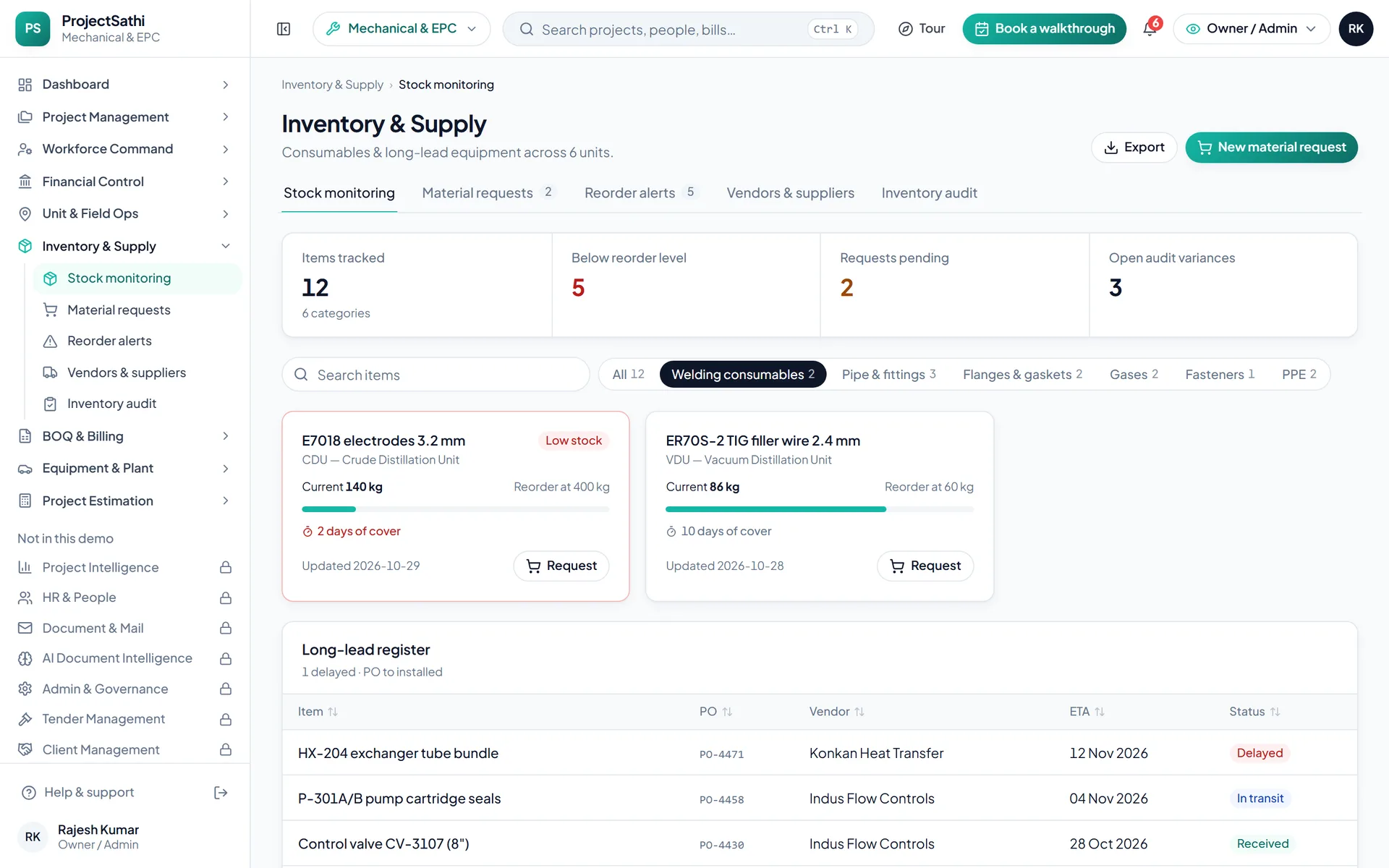
Certified quantities become the progress bill. Gross, net payable, due date and status for every bill, and the GST filing periods behind them.
BOQ & Billing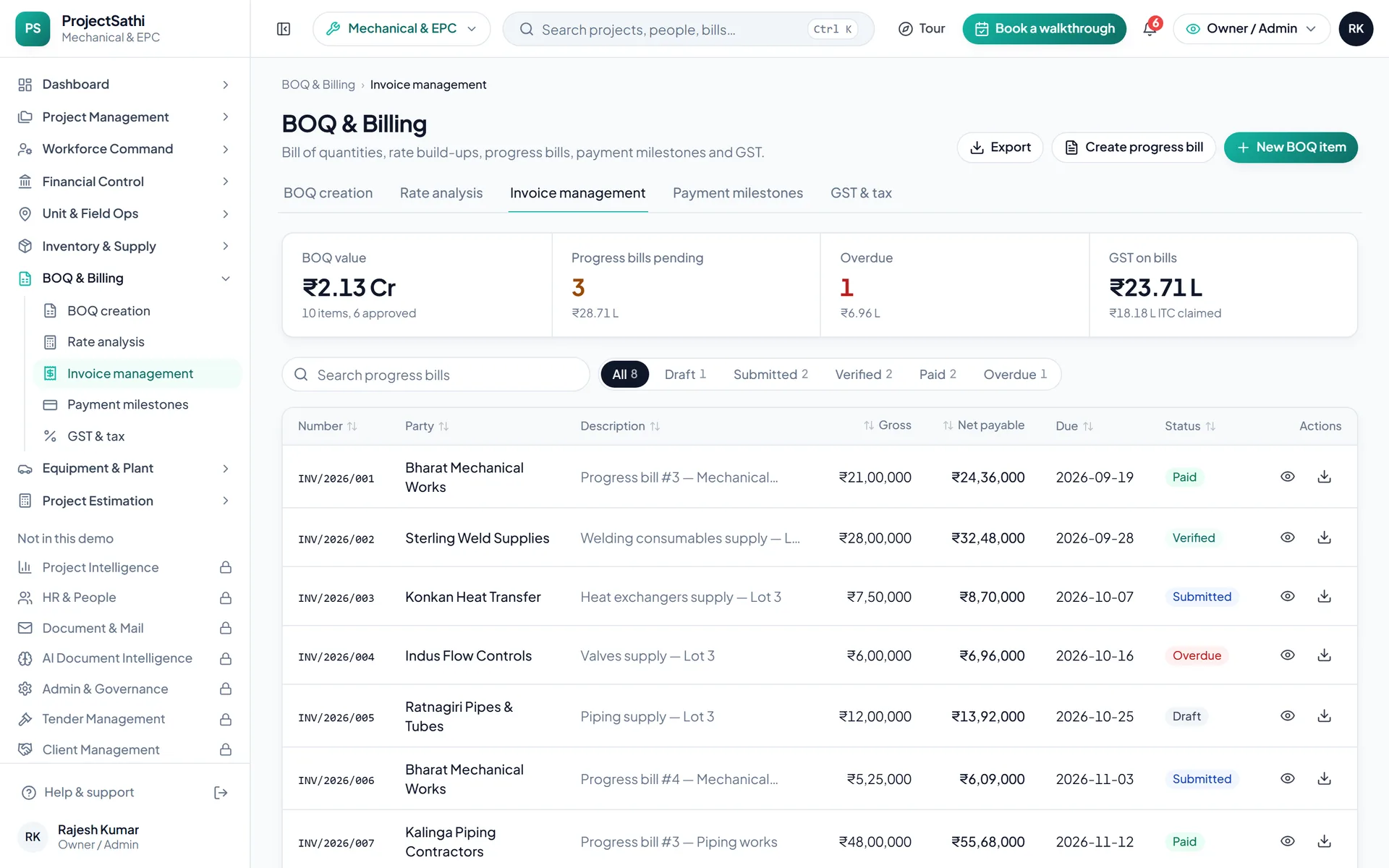
Real product screen from the live demo, sample data.
Types of work
The type of work sets the dashboard title, the unit of progress and the names of the work packages.
Compressed, interlocking work on a live plant
Shop fabrication through to site erection
Spools, fit-up, welding and hydrotest
Modules on by default
Already ticked in the setup wizard. Untick what you don't need, or open a plan group to add more; Dashboard always stays on.


Try five things
Everything is sample data, so click freely. These five show most of what the product does.
Open Project Intelligence → All bills. Pick a bill that's waiting, check the submitted and recommended amounts, and approve it (or reject it with a reason). The register and the dashboard update straight away.
Open Financial Control → Salary processing, preview the month's payroll and process it. Then go to Bank transfers and download the NEFT bulk-payment file, and open Payslips to print one.
Open Inventory & Supply → Material requests and raise one for a site. Approve it, then issue the stock against it and watch the stock level change in Stock monitoring.
Almost every register has an Export menu. Open Dashboard → Reports (or any list) and export it to Excel (CSV) or PDF.
Use the role switcher in the header to view the workspace as the owner, a project manager or a site engineer. The project manager doesn't see payroll, AI documents or admin; the site engineer sees site work, stores and mail, and can't edit records.
Name, company, an email and a WhatsApp number. A 6-digit code confirms the email.
Civil, mechanical, chemical, energy or architecture; then the type of work; then the modules you want on, grouped by plan.
The workspace opens with sample projects in your vocabulary. The tour walks the screens that matter, then it's yours to click through.
project management software for mechanical and EPC contractors
A turnaround is a few thousand interlocking tasks on a live plant with a fixed end date, and a fabrication-and-erection job is the same problem stretched over a year: a spool late out of the shop holds up a crane that is being paid for by the hour. Project management software for mechanical and EPC contractors has to show the critical path, the hired plant and the money on one screen, because the owner and the PMC will ask about all three in the same meeting.
Shutdown, fabrication, erection and piping work is planned in Project Management as work packages with dependencies and a critical path, so the team waiting on a completed spool or a cleared foundation sees the slippage before it reaches them. Progress is logged in Site Management as shift reports from the mobile app, with fit-up, welding and hydrotest recorded against the package and photos geo-stamped on the unit. The demo's Turnaround Command Center opens with work packages on the critical path, spools fabricated against erected, long-lead items due in 30 days and headcount on the unit as its headline figures, which is the view a turnaround manager wants at the start of every shift rather than a status collected by phone.
On an erection job the cost that gets away is the crane sitting idle and the hired plant that quietly rolls over at the old rate. Fleet & Mobility tracks cranes, welding sets and hired plant with utilisation and cost per project, holds the hire contracts and renewal calendars, and reconciles fuel. Inventory & Supply tracks spools, valves, fittings and consumables per location with consumption velocity, runs material requests from the unit through approval to issue, and raises reorder alerts before a long-lead item stalls the schedule. Vendor ratings, payment history and lead-time tracking live on the same vendor master, so procurement judges a supplier on what it delivered last time rather than on the quote.
Certified quantities become GST-ready progress bills in BOQ & Billing, with submitted, recommended and approved amounts on each. Project Estimation builds the pre-bid bill of quantities from a rate library with scenario comparison, so when the package is won the estimate becomes the budget and estimate-versus-actual is visible as the job runs. On the cost side, Workforce Command gives the CFO fully loaded people cost per project and per legal entity, payroll what-if scenarios for a headcount swing of forty fitters, and one-click allocation of crews between units, while Financial Control runs the payroll with PF, ESI, PT and TDS and tracks imprest cash. Execution, payroll and billing roll into one project P&L with variance alerts for the project director.
A mechanical contractor answers to the owner and the PMC, and both want the same thing: evidence. The Dashboard gives the owner's team cash position and budget utilisation per unit, the project manager what is slipping, and the field engineer what is blocked. Pending approvals sit in one inbox, and every change is logged with user, timestamp and previous value. The same shift reports, material issues and progress bills that run the job are the records that settle a variation or a delay claim later, so there is no second set of documents to assemble when the PMC asks for the history of a package.
Questions
Longer pages on the problems this industry brings us.
We set it up with one of your live projects, your work packages and your BOQ before the call.